
Can You Automate LinkedIn Engagement Without Getting Banned? The Complete 2025 Guide
Every day, thousands of LinkedIn users receive the dreaded notification: "Your account has been restricted." The culprit? Usually, it is automation tools that promised exponential growth but delivered an account suspension instead. For professionals who rely on LinkedIn for their livelihood, this is a nightmare scenario. However, here is the truth most gurus won't tell you: LinkedIn automation isn't inherently dangerous—it's how you automate that matters.
Professionals today face an impossible choice: spend 2-3 hours daily engaging on LinkedIn manually to feed the algorithm, or risk account restrictions by using clumsy automation tools. With LinkedIn being the primary lead generation platform for 80% of B2B professionals, this dilemma costs businesses thousands in lost opportunities and wasted time. The fear of losing a carefully curated network often paralyzes users into inaction, preventing them from scaling their outreach.
This comprehensive guide reveals exactly can you automate LinkedIn engagement without getting banned, which specific activities trigger bans, the technical differences between risky bots and safe AI, and the daily limits you must follow to grow your presence. We will explore how modern solutions like Linkmate are changing the landscape by prioritizing safe, intelligent comment generation over risky connection spam.
Understanding LinkedIn's Automation Policies and Terms of Service
To navigate the waters of automation safely, you must first understand the rules of the road. Many users operate on hearsay, but a deep dive into LinkedIn's official stance reveals nuances that smart marketers can leverage.
What LinkedIn's User Agreement Actually Says
Technically, LinkedIn’s User Agreement (specifically Section 8.2) prohibits the use of "bots or other automated methods to access the Services, add or download contacts, send or redirect messages." On paper, this sounds like a blanket ban on all software. However, the reality of enforcement is different. LinkedIn’s primary goal is to protect its members from spam, harassment, and data scraping.
The platform is less concerned with a user utilizing a tool to help manage their time and more concerned with users who degrade the ecosystem. If you are using automation to blast 500 irrelevant sales pitches a day, you are a target. If you are using tools to facilitate genuine engagement at a human pace, you are flying under the radar.
The Difference Between Prohibited and Tolerated Automation
There is a distinct line between what is strictly prohibited and what is generally tolerated within reasonable limits.
- Prohibited (The "Ban Zone"):
- Scraping: Extracting large volumes of user data (emails, phone numbers) without permission.
- Spamming: Sending identical, low-quality messages to thousands of people in a short timeframe.
- Fake Accounts: Creating bot profiles to artificially inflate follower counts.
- Tolerated (The "Growth Zone"):
- Scheduling: Tools that post content at specific times (e.g., Buffer, Hootsuite).
- Smart Engagement: AI-assisted commenting that reads a post and suggests a relevant response.
- CRM Integration: Syncing LinkedIn conversations with Salesforce or HubSpot.
Recent Policy Updates and Enforcement Trends in 2024
In 2024, LinkedIn tightened its grip on "lazy" automation. The platform introduced stricter weekly invitation limits (capping most users at around 100 per week) and improved its ability to detect browser-based extensions. The trend is clear: LinkedIn is moving away from punishing all automation and toward punishing unnatural behavior. This shift favors intelligent, AI-driven tools over script-based bots.
How LinkedIn Detects Automation (And What Triggers Account Restrictions)
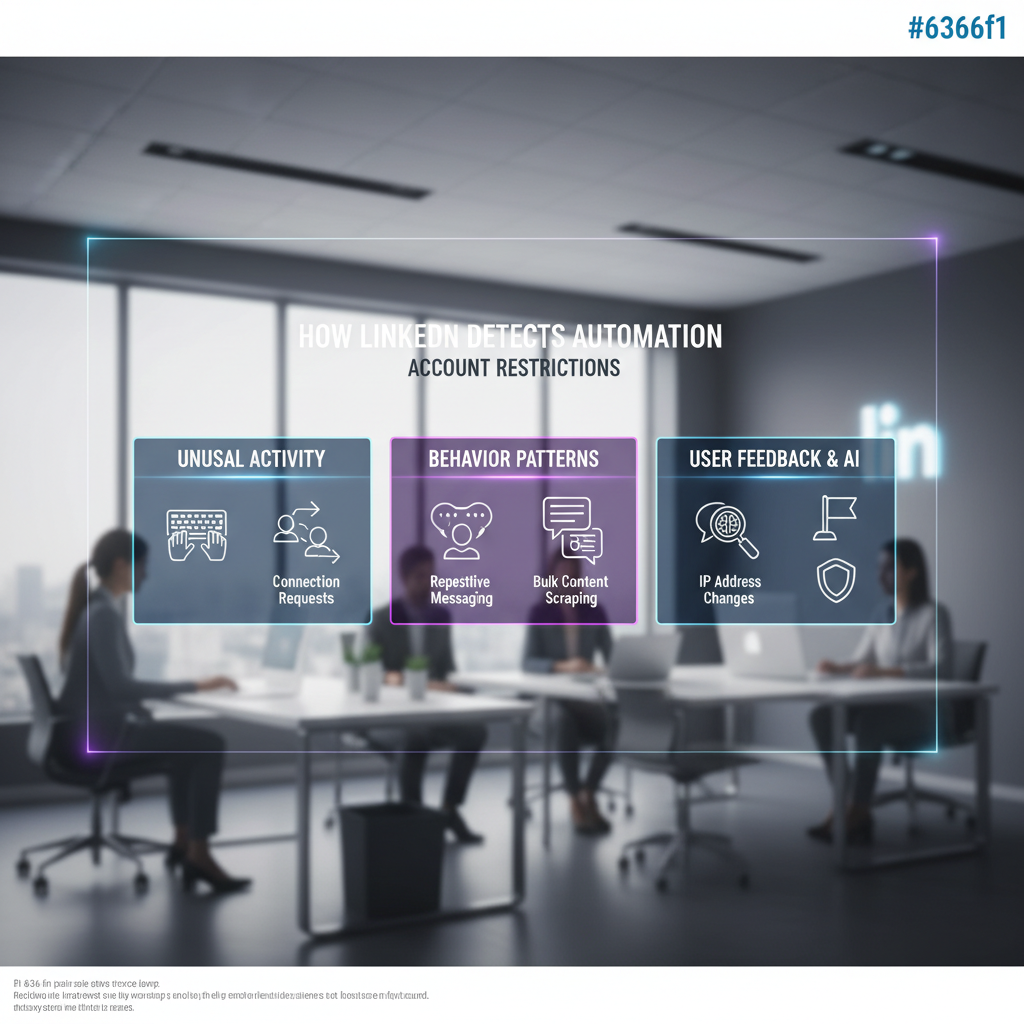
If you are wondering "can you automate LinkedIn engagement without getting banned," you need to think like a software engineer at LinkedIn. The platform uses sophisticated algorithms to flag accounts. Understanding these triggers is your best defense.
Activity Velocity: The #1 Red Flag
The most common reason for a ban is "velocity"—the speed at which actions are performed. No human can visit 50 profiles in one minute, or send 100 connection requests in an hour.
Legacy automation tools often execute tasks as fast as the internet connection allows. LinkedIn’s servers see this rapid-fire activity and immediately flag the account. Safe automation mimics human pauses. It reads a post, "thinks" (pauses), and then acts. If your tool doesn't have randomized delays, you are at high risk.
LinkedIn's Detection Algorithms: Behavioral Pattern Analysis
Beyond speed, LinkedIn looks for patterns. Humans are chaotic; bots are linear.
- Bot Pattern: Visits profile A -> Waits 30 seconds -> Sends Connect Request -> Visits profile B -> Waits 30 seconds -> Sends Connect Request.
- Human Pattern: Scrolls feed -> Likes a post -> Comments on a post -> Clicks a profile -> Reads "About" section -> Sends connection request -> Goes to grab coffee (inactive for 15 mins).
If your activity graph looks like a perfect heartbeat, you will get caught.
Browser Extensions vs. Cloud-Based Tools
This is a critical technical distinction.
- Browser Extensions: These live in your Chrome browser. They are easier for LinkedIn to detect because they often inject code directly into the webpage you are viewing. LinkedIn can "see" the extension modifying the DOM (Document Object Model).
- Cloud-Based Tools: These operate on a separate server. They log into your account from a different location (ideally using a dedicated IP address). Because they don't manipulate the page in your local browser, they are generally harder to detect, provided they use high-quality proxies.
The Role of IP Addresses
If you log into LinkedIn from New York on your phone, but your automation tool logs in from a server in Germany five minutes later, LinkedIn’s security systems will trigger a verification challenge or a temporary lock. This is why premium tools like Linkmate emphasize the importance of consistent geographical IP addresses.
The Risk Spectrum: Ranking LinkedIn Automation Activities
Not all automation is created equal. When asking "can you automate LinkedIn engagement without getting banned," the answer depends heavily on what you are automating. We can rank activities from "Red Alert" to "Green Light."
High-Risk Activities: Connection Requests and InMail
Automating connection requests is the riskiest activity on LinkedIn. Why? Because it involves interrupting another user.
- The Rejection Factor: If you send automated requests and people click "I don't know this person," your account health plummets.
- The Cap: LinkedIn has a hard cap (approx. 100/week). Automation tools can burn through this in an hour, triggering an immediate restriction.
Medium-Risk Activities: Profile Viewing and Post Liking
Viewing profiles (to trigger a "notification" for the other person) is a classic growth hack. It is medium risk. While less intrusive than a connection request, viewing 1,000 profiles a day is physically impossible for a human and will trigger velocity filters. Similarly, "mass liking" posts can look like bot behavior if done too rapidly.
Lower-Risk Activities: Comment and Engagement Automation
This is the sweet spot for 2024. Automating comments is significantly safer than automating outreach.
- The Platform Loves It: LinkedIn wants engagement. They want discussions in the comments section.
- Low Negative Feedback: Users rarely report a comment unless it is offensive or obviously spammy.
- High Visibility: A thoughtful comment on a popular post can drive more profile views than 50 cold connection requests.
Why AI-Powered Engagement is Harder to Detect
This is where tools like Linkmate shine. Old-school bots would comment "Great post!" on everything. This is easily detected as spam.
AI-powered engagement reads the post content and generates a contextually relevant response.
- Post: "I'm sad to announce layoffs at our company."
- Old Bot: "Great post! Thanks for sharing!" (Bannable offense due to user reports).
- AI Tool: "I'm so sorry to hear this. navigating layoffs is incredibly tough for leadership and the team. Wishing everyone the best." (Indistinguishable from a human).
Because the content is unique every time, it bypasses spam filters that look for repeated text strings.
Safe LinkedIn Automation Limits: The Numbers You Need to Know
To automate safely, you must respect the limits. Note that these numbers are estimates based on current user data, as LinkedIn does not publish official limits (to prevent gaming the system).
Daily Connection Request Limits
- Safe Zone: 15-20 requests per day.
- Maximum: 100 per week (LinkedIn's hard limit).
- Strategy: Do not try to automate this max. If you use automation here, keep it well below the limit to leave room for manual connections.
Engagement Activity Limits
- Likes: Up to 50-100 per day is generally safe, provided they are spaced out over hours.
- Comments: 20-40 comments per day. This is high volume for a human, but if spaced out (e.g., 3-4 comments per hour), it is sustainable.
- Reactions: Vary your reactions. Don't just "Like" everything; use "Celebrate" or "Insightful" to mimic human nuance.
Message Limits
- New Connections: 20-30 messages per day.
- Existing Connections: Up to 80-100 messages per day (if you are in active conversations).
- Warning: Sending the exact same message to 50 people will trigger spam filters even if you are under the numerical limit.
How to Calculate Your Personal Threshold
If you have a new account (less than 6 months old) or low connections (<500), cut these limits in half.
- The Warm-Up Rule: Never start at max speed.
- Week 1: 10 interactions/day.
- Week 2: 20 interactions/day.
- Week 3: 30 interactions/day.
- Week 4: 40 interactions/day.
Best Practices for Automating LinkedIn Engagement Without Getting Banned
You have the tools and the numbers. Now, here is the strategy to ensure longevity.
The 80/20 Rule: Balancing Automated and Manual Activity
The most successful LinkedIn growers use automation for the heavy lifting but keep a human hand on the wheel.
- 80% Automated: Liking posts in your niche, viewing profiles, and generating draft comments.
- 20% Manual: Replying to DMs, writing your own posts, and finalizing/approving the AI-generated comments.
Linkmate excels here by acting as a copilot. It can generate the comment for you, but allowing you to review it ensures that "human-in-the-loop" safety net that prevents embarrassing mishaps.
Randomization and Human-Like Timing
Never set a tool to perform an action "every 5 minutes." That is a robotic signature. Ensure your tool offers:
- Random Delays: Intervals between 4 and 12 minutes.
- Sleep Mode: The tool should shut off completely for 8-10 hours a day (to simulate sleep) and take breaks on weekends.
Quality Over Quantity: Targeting the Right Connections
Banning often comes from user reports. If you automate engagement on irrelevant content, people will flag you.
- Sales Professionals: Target posts containing keywords like "hiring," "looking for software," or specific industry pain points.
- Recruiters: Engage with content from specific companies or job titles, not just broad keywords like "developer."
Regular Account Health Checks
Monitor your account for "soft blocks."
- Signs of trouble: You are asked to enter a CAPTCHA frequently. Your reach on posts suddenly drops to near zero (shadowban). You can't send invites for a few hours.
- Action: If any of these happen, pause all automation for 72 hours immediately.
AI-Powered vs. Traditional Automation: Why the Technology Matters
The question "can you automate LinkedIn engagement without getting banned" is increasingly becoming "are you using AI or scripts?"
How Legacy Bots Trigger Detection
Legacy bots are "dumb." They execute if this, then that scripts. They click elements on a page based on X/Y coordinates. If LinkedIn updates its website layout (which they do often), these bots break or start clicking the wrong things, creating erratic behavior that flags security systems.
The AI Advantage: Context-Awareness
AI tools use Natural Language Processing (NLP). They don't just "click"; they "understand."
- Context: AI analyzes the sentiment of a post. If a prospect posts about a promotion, the AI suggests "Congratulations!" If they post about a challenge, the AI suggests advice or empathy.
- Relevance: This relevance keeps your "Flagged as Spam" score low. LinkedIn’s algorithm sees that your comments are receiving likes and replies from the author, which signals that you are a high-value user, actually protecting you from bans.
The Future: Undetectable AI Engagement
Tools like Linkmate represent the future. By focusing on commenting, they leverage the one activity LinkedIn actively wants to increase. Furthermore, by using AI to generate unique text for every interaction, they eliminate the "duplicate content" footprint that usually catches spammers.
For content creators and thought leaders, this is a game-changer. You can maintain visibility with your top 50 prospects by automatically commenting on their posts, keeping you top-of-mind without spending your entire morning typing.
What to Do If Your LinkedIn Account Gets Restricted

Even with the best precautions, mistakes happen. If you see the restriction notice, do not panic.
Types of Restrictions
- Temporary Restriction: Usually lasts 24-48 hours. A warning shot.
- ID Verification Restriction: LinkedIn asks for a driver's license to prove you are a real person.
- Permanent Restriction: The "nuclear option," usually reserved for repeat offenders or severe spam.
Immediate Steps to Take
- Stop All Tools: Disconnect every third-party app immediately. Change your LinkedIn password (this forces a logout on all active sessions).
- Wait: Do not try to log in repeatedly. Wait 48 hours.
- Clear Cache: Clear your browser cookies and cache before logging back in.
How to Appeal
If the account remains locked, you must appeal.
- Be Professional: Do not get angry.
- The Script: "I believe my account was restricted in error. I have been traveling recently (explaining IP changes) and engaging heavily to grow my network. I have reviewed the User Agreement and will ensure my activity remains within limits. Please help me restore access to my professional network."
- Honesty (Partial): If you were using a Chrome extension, admit you had a browser plugin you didn't realize was non-compliant and have since removed it.
Recovery Timeline
Once reinstated, do not turn automation back on immediately.
- Week 1: Manual usage only. mobile app preferred.
- Week 2: Very light automation (20% of previous limits).
- Long Term: Switch to a safer tool (Cloud-based AI) if a browser extension caused the ban.
Choosing Safe LinkedIn Automation Tools: What to Look For
To answer "can you automate LinkedIn engagement without getting banned" affirmatively, you must choose the right partner.
Red Flags (Avoid These Tools)
- "Unlimited" Promises: Any tool promising unlimited InMails or connections is lying or dangerous.
- Chrome Extensions (Unless highly reputable): As discussed, these are risky.
- No "Human-in-the-Loop": Tools that auto-post comments without letting you review them first are risky for your reputation.
Green Flags (Safety Features)
- Cloud-Based Architecture: Runs on a dedicated server, not your browser.
- AI Integration: Uses GPT or similar tech for context.
- Smart Limits: Automatically stops activity when daily limits are reached.
- Dedicated IP: Offers a static IP address that matches your location.
Why Linkmate Fits the "Safe" Criteria
Linkmate was built specifically to solve the safety paradox. By focusing on comment automation, it targets the lowest-risk, highest-reward activity on LinkedIn.
- It doesn't spam inboxes (High Risk).
- It doesn't mass-connect (High Risk).
- It generates thoughtful, AI-driven comments that encourage replies and profile visits.
For a startup founder or busy sales rep, this offers the visibility of a "power user" without the ban risk of a "spammer."
Conclusion
Can you automate LinkedIn engagement without getting banned? The answer is a definitive yes—but only if you abandon the "spam and pray" tactics of the past.
The era of blasting out thousands of generic connection requests is over. LinkedIn’s algorithms are too smart, and users are too fatigued. The new era belongs to intelligent engagement. By shifting your focus from cold outreach to meaningful commenting and content interaction, you align your goals with LinkedIn’s own algorithms.
Key Takeaways for Safe Automation:
- Prioritize Commenting: It is safer and more effective for visibility than connection spam.
- Respect the Velocity: Mimic human timing with randomized delays and sleep modes.
- Use AI, Not Scripts: Context-aware engagement is undetectable; generic "Nice post!" comments are red flags.
- Know Your Limits: Stay well under the 100 connections/week cap.
- Choose Cloud-Based Tools: Move away from risky browser injections.
B2B sales is a marathon, not a sprint. Your LinkedIn account is a digital asset worth protecting. Don't risk it on cheap bots. Invest in technology that understands the nuance of human conversation.
Ready to grow your LinkedIn presence safely?
Stop gambling with your account health. Discover how Linkmate's AI-powered comment automation helps you maintain authentic engagement without the risk. Start building meaningful connections with intelligent automation that LinkedIn's algorithms can't distinguish from human activity.